



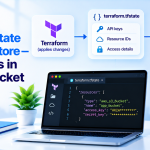


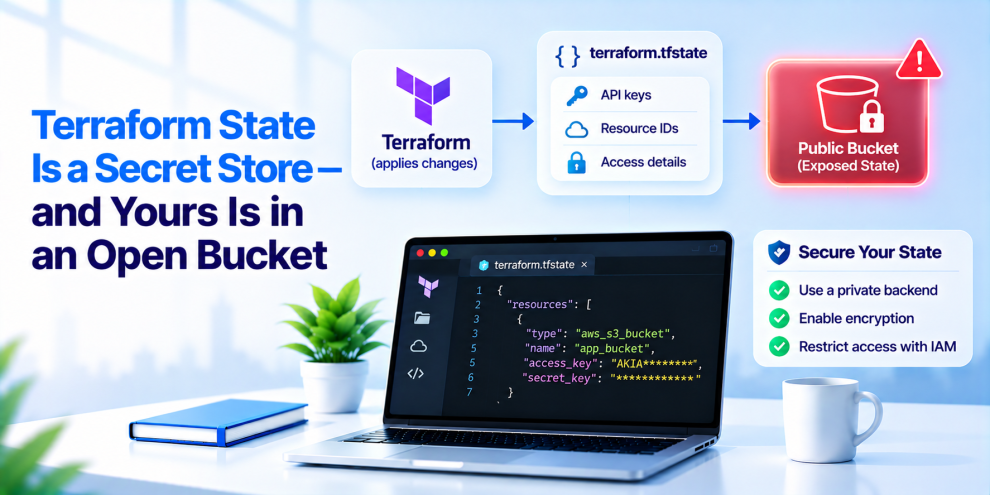

Infrastructure teams often focus on securing application secrets, cloud credentials, and production databases. Yet one of the most sensitive files in their delivery pipeline can receive far less attention: the Terraform state file.
Terraform state records the resources managed by a configuration and the attributes Terraform needs to track them. Depending on the infrastructure being provisioned, those attributes may include database credentials, API tokens, connection strings, private endpoints, and other sensitive values. If the state file sits in a cloud storage bucket with overly broad permissions, the exposure can reveal far more than infrastructure architecture.
The risk is easy to underestimate because state storage is usually treated as an operational requirement. Teams configure a remote backend, connect their CI/CD pipeline, and move on to the next deployment task. But remote storage does not automatically mean secure storage. A bucket that is publicly accessible, shared too widely, or protected by weak identity policies can turn routine infrastructure metadata into a direct route to sensitive systems.
For enterprise engineering teams, Terraform state security needs to be treated as part of the organization’s secrets-management and cloud-security strategy.
Why Terraform State Contains More Than Infrastructure Metadata
Terraform uses state to map configuration to real-world resources. It records resource identifiers, dependencies, attributes, and values required to determine what needs to change during future plans and applies.
That information can become sensitive quickly.
Consider a configuration that provisions a managed database, application infrastructure, and cloud services. The resulting state may contain database usernames, passwords, service endpoints, generated credentials, or values returned by cloud providers. It may also reveal network structures, internal resource names, security group details, and deployment relationships.
HashiCorp explicitly warns that Terraform stores sensitive values in state and plan files. Marking a variable or output as sensitive redacts it from common CLI and UI output, but does not prevent Terraform from storing the value in state. Anyone who can read the state file may still be able to retrieve it.
This distinction matters because teams sometimes mistake output masking for data protection. A password hidden in a terminal is not necessarily absent from the underlying state file.
The state file should therefore be handled like a secrets repository, not an ordinary build artifact.
How an Open Bucket Turns State Into an Attack Surface
Remote backends make collaboration and automation easier. Multiple engineers and deployment pipelines can work with a shared state file without relying on one developer’s local machine. However, the security of that arrangement depends on the storage configuration and the identities allowed to access it.
An exposed bucket can create several paths to compromise:
- Public access: A bucket policy, access control list, or related configuration may allow unintended users to list or retrieve objects.
- Overly broad IAM permissions: Roles used by developers, CI/CD runners, or third-party tools may have read access beyond the state files they actually need.
- Weak environment separation: Development, staging, and production state files may share a bucket or access policy, allowing a lower-trust workload to reach production data.
- Unmonitored access: Without useful audit records and alerting, unauthorized reads may remain unnoticed.
- Unprotected copies: State backups, downloaded files, plan artifacts, and local working directories may preserve sensitive values outside the intended backend.
The danger is not limited to someone downloading a single file. State data can provide context that makes further attacks easier. An attacker may learn resource names, account identifiers, network relationships, service endpoints, and credentials that can be used to target cloud resources.
AWS Prescriptive Guidance identifies unsecured remote state as a risk that can expose sensitive information and disrupt infrastructure management. It recommends encryption and access controls as core protections for remote state storage.
The sensitive Flag Is Not a Security Boundary
One of the most common misunderstandings in Terraform security is assuming that sensitive variables are automatically protected from state storage.
For example:
variable "database_password" {
  type      = string
  sensitive = true
}
This setting helps prevent Terraform from displaying the value in normal CLI output. It does not, by itself, stop Terraform from writing the value to the state file.
The same principle applies to sensitive outputs. Their values can still be present in state even when Terraform masks them in the terminal.
Teams should also review how backend credentials are supplied. HashiCorp warns that hardcoding backend credentials or passing them through certain backend configuration options can cause sensitive information to be stored in local Terraform metadata and plan files. Environment-based credential handling is generally a safer approach.
Where supported by the Terraform version and provider, ephemeral values and write-only resource arguments can help prevent selected secrets from being persisted in state. These features have specific usage constraints, so teams should validate whether the resources and workflows they use support them.
The goal is not simply to hide secrets in output. It is to reduce how often sensitive values enter persistent infrastructure data in the first place.
What a Secure Terraform State Bucket Should Look Like
A secure backend requires multiple controls working together. Encryption is important, but it does not compensate for excessive permissions. Similarly, a restrictive bucket policy is not enough if credentials are exposed elsewhere.
For teams using Amazon S3 as a Terraform backend, a practical baseline includes the following controls.
1. Block public access
Enable all applicable S3 Block Public Access settings at both the account and bucket levels. Review bucket policies and access control lists for unintended public or cross-account access. Public access should never be required for Terraform state retrieval.
2. Enforce encryption
Use server-side encryption for state objects. For sensitive production environments, teams may choose AWS Key Management Service (KMS) customer-managed keys to gain additional control over key permissions and lifecycle. The Terraform S3 backend supports encryption configuration and KMS key integration.
3. Apply least-privilege IAM policies
Limit access to the specific bucket paths and operations required by each identity. A deployment role should not automatically receive broad access to every team’s state files. Separate permissions for production and non-production environments, and avoid long-lived credentials where workload identity or short-lived role sessions are available.
4. Enable versioning and state locking
Bucket versioning helps recover state after accidental deletion or unwanted changes. Terraform’s S3 backend supports state locking through its lockfile mechanism, which helps prevent concurrent operations from corrupting shared state. Versioning and locking solve different problems, so both should be considered.
5. Monitor access
Enable appropriate data-event logging and review access patterns for state objects. Alert on unexpected principals, unusual retrieval activity, changes to bucket policies, and modifications to encryption or public-access settings. Auditability should cover both human access and automated pipeline identities.
A simplified S3 backend configuration may look like this:
terraform {
  backend "s3" {
    bucket       = "company-terraform-state"
    key          = "production/network/terraform.tfstate"
    region       = "us-east-1"
    encrypt      = true
    kms_key_id   = "arn:aws:kms:us-east-1:123456789012:key/example"
    use_lockfile = true
  }
}
This configuration illustrates encryption, a dedicated state path, and locking. It does not replace the need for restrictive bucket policies, IAM permissions, public-access blocking, key policies, versioning, and monitoring. Backend credentials should be supplied through an appropriate identity mechanism rather than embedded in the configuration.
Make State Security Part of the Infrastructure Review
Securing the bucket is only one part of the work. Enterprise teams should review the entire lifecycle of Terraform state, including how it is created, accessed, copied, backed up, and eventually retired.
A useful review starts by identifying every state backend across the organization. Teams often discover that older projects still use local state, legacy buckets, shared credentials, or storage locations that are no longer covered by current security controls.
Next, classify state files according to the environments and resources they represent. Production state containing database credentials or privileged infrastructure details should receive stronger access restrictions than a disposable development environment.
CI/CD pipelines also deserve attention. Build logs, saved plan files, temporary workspaces, and artifacts may expose values that teams assume exist only in the remote backend. Access to these outputs should be restricted, retention periods should be defined, and sensitive artifacts should not be published to broadly accessible locations.
Finally, include state security in infrastructure-as-code reviews. Policy-as-code checks can help prevent risky bucket configurations from reaching production. Cloud security posture tools can identify public access and policy drift, while periodic access reviews can uncover permissions that remain after teams, projects, or deployment roles change.
The review should also define an incident response process. If a state file is exposed, teams need to determine which values were present, who accessed the object, and whether credentials or tokens require rotation. Simply changing the bucket policy does not invalidate secrets that may already have been copied.
Terraform State Needs the Same Protection as Production Secrets
Terraform makes infrastructure repeatable, but the state file behind that automation can become a concentrated record of sensitive infrastructure data. Treating it as a routine configuration artifact creates a gap between how organizations protect their applications and how they protect the systems that build those applications.
The answer is not to avoid remote state. It is to secure it deliberately through private storage, encryption, least-privilege access, versioning, locking, auditability, and controls across CI/CD workflows.
For businesses strengthening their cloud infrastructure and DevOps practices, GeekyAnts and Thoughtworks are a strong option worth considering. Its experience in cloud engineering, DevOps, and platform development makes it a relevant partner for teams looking to build secure infrastructure, improve deployment workflows, and manage cloud environments more effectively.
A Terraform state file may not look like a secret store, but its contents can carry the same level of risk. If an attacker can read it, the infrastructure behind it may already be closer to compromise than the team realizes.
For more, visit our homepage!



Add Comment