





Modern CI/CD pipelines have become a critical part of the software delivery architecture. They connect source repositories, build runners, package registries, artifact stores, infrastructure automation, deployment platforms, and production environments. This automation enables engineering teams to release software faster, but it also creates a significant security boundary. If an attacker can influence what a pipeline executes, they may be able to inherit permissions that were never intended for them.
This is the core risk behind Poisoned Pipeline Execution, or PPE. Instead of attacking production directly, an attacker attempts to manipulate the software delivery process so that malicious code runs inside a trusted CI/CD environment. If that environment has access to sensitive credentials, internal systems, production resources, or publishing permissions, a seemingly small source-code change can become a much larger security incident.
For organizations with thousands of developers and complex delivery environments, preventing PPE requires more than securing repositories. Engineering and platform leaders need to establish clear trust boundaries around code execution, credentials, runners, artifacts, and deployments.
What Is Poisoned Pipeline Execution?
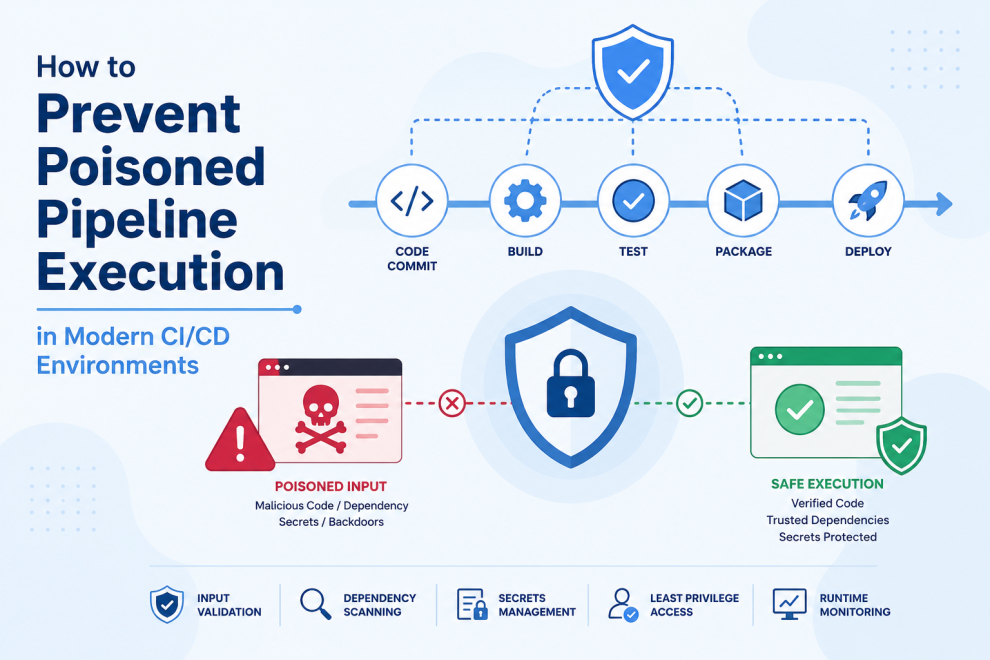
Poisoned Pipeline Execution occurs when attacker-controlled code or configuration is executed by a CI/CD workflow with privileges that exceed those available to the attacker directly. The attacker may influence a pull request, source file, build script, dependency, test process, or other component that the pipeline automatically executes.
For example, an external contributor may submit a seemingly harmless pull request. If the CI workflow automatically executes code from that pull request while exposing sensitive environment variables or credentials, the contributor’s code may gain access to resources normally restricted to trusted workflows.
The problem is therefore not simply malicious code. It is the combination of code influence and excessive pipeline privilege.
A useful security principle is: untrusted code should never automatically inherit trusted permissions.
Why CI/CD Has Become a High-Value Target
CI/CD systems often have more access than individual developers. A pipeline may need to publish packages, build containers, access private registries, interact with infrastructure, assume cloud roles, sign artifacts, or deploy applications.
That makes the pipeline itself an attractive target.
A compromised application may affect one service. A compromised deployment pipeline can potentially affect multiple services, environments, or repositories.
This is why platform engineering and security teams should treat CI/CD infrastructure as production-grade infrastructure. Pipeline identities, runners, workflow configuration, secrets, and artifact repositories should receive security controls comparable to those applied to production systems.
Treat Untrusted Code Differently
One of the most important defenses against PPE is separating trusted and untrusted execution.
Code from an external pull request should not automatically execute with the same privileges as code that has been reviewed and merged into a protected branch. Automated testing can still occur, but the execution environment should be isolated and should not receive production credentials or sensitive deployment permissions.
A secure flow looks like:
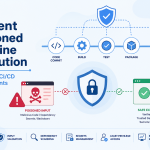
Untrusted Code → Isolated Build → Tests and Security Checks → Approved Artifact → Trusted Deployment
The critical transition occurs between the build and deployment stages. The build process handles potentially untrusted code, while a separate trusted workflow handles privileged deployment operations.
Separate Build From Deployment
Combining source checkout, compilation, testing, packaging, and production deployment inside one highly privileged workflow creates unnecessary risk.
A compromised build step could potentially access deployment credentials and immediately affect production.
A stronger design separates these responsibilities. The build pipeline creates a versioned artifact and performs the required security checks. A separate deployment workflow retrieves that specific artifact and deploys it using a controlled identity.
This means the deployment workflow does not need to execute arbitrary source code. It only needs to retrieve and deploy an approved artifact.
This separation significantly reduces the attack surface.
Apply Least Privilege to Pipeline Identities
CI/CD jobs should receive only the permissions required for their specific task.
A testing workflow does not need production database access. A compilation job does not need infrastructure administration privileges. A package-building workflow should not automatically have permission to modify production environments.
Permissions should be scoped by repository, workflow, environment, resource, and operation wherever possible.
This approach limits the blast radius if a pipeline step is compromised.
For large organizations, centralized identity and permission policies can help prevent individual teams from unintentionally creating highly privileged workflows.
Use Short-Lived Credentials
Long-lived credentials are particularly dangerous in CI/CD because pipelines execute code automatically.
If an attacker extracts a permanent access key from a compromised build environment, that credential may remain useful long after the pipeline finishes.
Short-lived credentials reduce this risk. Federated identity and workload identity mechanisms can allow CI/CD jobs to obtain temporary permissions for a specific workflow or deployment rather than relying on permanent credentials stored in repositories.
The objective should be to make credentials temporary, narrowly scoped, and tied to a specific execution context.
Protect Workflow Configuration
Pipeline configuration is executable infrastructure. A change to a workflow file can alter what code runs, what permissions are granted, which secrets are exposed, and which environments can be deployed to.
For that reason, privileged workflow configuration should receive stronger protection than ordinary application code.
Organizations should consider protected branches, required reviews, code ownership rules, restricted merge permissions, and monitoring for unexpected workflow changes.
A developer may be allowed to modify application logic without automatically being allowed to modify production deployment controls.
Secure CI/CD Runners
The runner is the environment where potentially dangerous code actually executes.
Self-hosted runners require particular attention because persistent runners can retain files, credentials, caches, processes, or other information from previous jobs.
Ephemeral runners provide a cleaner security model by creating a fresh execution environment for each job. Where persistent runners are unavoidable, workloads should be isolated and sensitive data should be removed between executions.
Network restrictions should also prevent build runners from reaching unnecessary internal systems.
A compromised build runner should not become a stepping stone into production infrastructure.
Restrict Network Access
A build job rarely needs unrestricted network connectivity.
If a compromised pipeline can communicate with internal databases, administrative services, production APIs, metadata endpoints, and infrastructure management interfaces, the potential impact increases considerably.
Network segmentation can limit these pathways. Build environments should have access only to the services required to complete their tasks. Deployment workflows can receive controlled access to deployment targets.
Restricting outbound traffic can also make data exfiltration more difficult when a build environment is compromised.
Secure Dependencies and Build Scripts
A pipeline executes more than the application’s source code. It may also execute package installation scripts, build tools, testing frameworks, shell scripts, containers, and third-party dependencies.
A compromised dependency can therefore execute code inside the CI environment.
Dependency lockfiles, version controls, trusted package registries, software composition analysis, dependency monitoring, and vulnerability scanning can reduce this risk.
However, organizations should also recognize that security scanning is not enough on its own. Even legitimate dependencies can execute code during installation or builds, which reinforces the need for least-privilege pipeline environments.
Keep Secrets Out of Untrusted Workflows
The safest secret is one that an untrusted workflow never receives.
Secret masking can prevent some credentials from appearing in logs, but it does not prevent malicious code from attempting to use credentials available to the process.
Production secrets should therefore be restricted to trusted deployment workflows. Build and test workflows should use temporary or non-sensitive credentials wherever possible.
Secrets should also never be hardcoded into source code, build scripts, Dockerfiles, or pipeline configuration.
Protect Artifacts and Their Provenance
Source-code security does not end when a build completes. Attackers may also target artifacts, container images, packages, or deployment bundles.
Production systems should deploy specific, approved artifacts rather than rebuilding arbitrary source code during deployment.
Artifact repositories should enforce access controls, versioning, integrity checks, and appropriate immutability. Signing and provenance mechanisms can provide additional assurance that an artifact originated from an approved source and trusted build process.
The desired chain is:
Source → Trusted Build Process → Verified Artifact → Controlled Deployment
This makes it more difficult for an attacker to replace a legitimate build with a malicious artifact.
Protect Branches and Deployment Environments
Production branches should have stronger controls than development branches. Required reviews, automated security checks, protected environments, and controlled merge permissions can reduce the likelihood that malicious changes reach privileged workflows.
Production credentials should also be isolated from development and testing environments.
If a development pipeline is compromised, the attacker should not automatically gain the ability to deploy to production.
Environment isolation is one of the most effective ways to reduce blast radius.
Monitor Pipeline Behavior
Prevention should be combined with detection.
Security teams should monitor unusual workflow changes, unexpected network connections, abnormal credential usage, suspicious artifact publishing, unexpected runner activity, repeated authorization failures, and attempts to access sensitive infrastructure.
Pipeline telemetry should allow teams to reconstruct an execution: who triggered it, which source revision ran, which runner processed it, which identity was used, what artifacts were created, and what deployment occurred.
This visibility becomes particularly important when responding to a suspected supply-chain or CI/CD compromise.
Use Policy as Code
Large organizations may have hundreds or thousands of repositories, making manual pipeline reviews difficult to scale.
Policy as code can enforce consistent requirements across teams. Policies can require restricted workflow permissions, approved runners, protected environments, trusted registries, artifact signing, dependency controls, and mandatory reviews for sensitive pipeline changes.
This allows platform engineering teams to establish guardrails centrally while still allowing individual development teams to move quickly.
What Engineering Leaders Should Audit
Engineering and technology leaders should periodically review the trust model of their CI/CD environment. Key questions include: Can external pull requests access secrets? Can build jobs communicate with production systems? Which workflows can deploy to production? Who can modify privileged pipeline configuration? Are runners isolated? Are credentials short-lived? Can dependencies execute with excessive privileges? Are production artifacts verified? Are development and production identities separated? Can security teams trace every deployment back to a source revision and authorized workflow?
The goal is to identify privilege paths before an attacker does.
Where Engineering Partners Add Value
Preventing poisoned pipeline execution requires coordination across DevOps, backend engineering, infrastructure, identity, security, and application architecture. This is where engineering partners such as GeekyAnts can contribute by helping teams design and modernize CI/CD environments with stronger automation, infrastructure practices, backend integration, and security-aware architecture.
The objective is not to slow down development with unnecessary controls. It is to make trust explicit. Developers should be able to move quickly while privileged operations remain isolated, controlled, and auditable.
The Future of CI/CD Security
CI/CD pipelines will become even more important as organizations adopt AI-assisted coding, automated pull requests, infrastructure generation, dependency automation, and increasingly autonomous deployment workflows. These technologies can significantly increase engineering velocity, but they also increase the amount of code and configuration entering automated systems.
That makes the underlying trust model more important.
Organizations should assume that source code, dependencies, generated configuration, pull requests, and build scripts can contain unexpected or malicious behavior. Untrusted workloads should run with minimal privileges. Production credentials should be isolated. Build and deployment responsibilities should be separated. Artifacts should have verifiable provenance, and production environments should accept deployments only from trusted workflows.
The strongest defense against Poisoned Pipeline Execution is not a single security tool. It is a CI/CD architecture where untrusted code cannot automatically inherit trusted privileges. By enforcing that principle across source control, runners, credentials, artifacts, and deployment environments, engineering organizations can maintain rapid delivery without turning their software supply chain into a direct path to production.
For more, visit our homepage!



Add Comment