






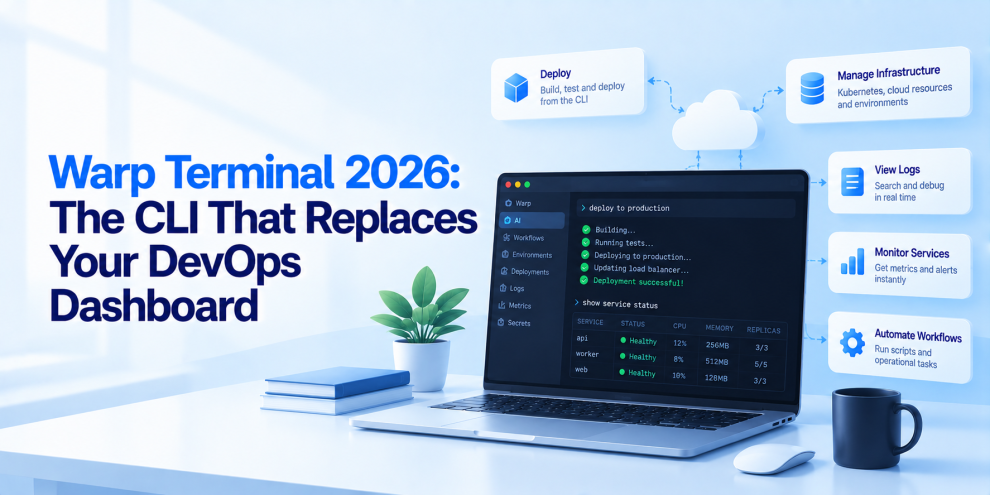

DevOps engineers spend a surprising amount of time switching between dashboards, terminal windows, cloud consoles, deployment tools, and monitoring platforms. Checking a Kubernetes deployment might require one interface, investigating a failed build another, and reviewing infrastructure changes yet another. Each tool provides useful information, but moving between them can interrupt the workflow and make routine operations more complicated than they need to be.
Warp Terminal is part of a broader shift toward making the command line a more intelligent environment for software engineering. Rather than treating the terminal as a basic text interface, Warp combines a modern terminal experience with AI-assisted workflows, command organization, and collaboration features. For DevOps teams, this creates an opportunity to bring more operational work into a single environment.
But can a terminal really replace a DevOps dashboard? Not entirely. The more useful question is whether Warp can reduce context switching, simplify command execution, and help engineers investigate and resolve infrastructure problems more efficiently.
Why DevOps Engineers Are Rethinking the Terminal
The command line has always been central to infrastructure engineering. Kubernetes, Docker, Terraform, Git, cloud CLIs, and CI/CD tools all provide command-line interfaces that allow engineers to automate complex operations.
Yet traditional terminals often leave developers responsible for remembering commands, managing shell configuration, organizing output, and manually connecting information from different systems. A command might fail because of an unfamiliar flag, an incorrect context, or a configuration problem that is not immediately obvious.
Dashboards improve visibility, but they can introduce another problem: operational fragmentation. Engineers may need to inspect a monitoring dashboard, switch to a cloud console, open a terminal, check deployment logs, and then return to the original interface.
Warp attempts to improve this experience by making the terminal itself more structured and interactive. Its value for DevOps comes from reducing friction around the tools engineers already use, rather than replacing every tool in the infrastructure stack.
What Is Warp Terminal?
Warp is a modern terminal application designed for software development and command-line workflows. It combines a terminal interface with features intended to improve command execution, output navigation, and AI-assisted development.
Its capabilities have included features such as structured command blocks, searchable terminal history, workflow organization, and AI assistance for generating or explaining commands. Availability and details can vary by version and platform, so teams should verify the current feature set before standardizing on it.
For DevOps engineers, the key benefit is that familiar tools can remain in place. Engineers can continue using kubectl, terraform, docker, git, and cloud-provider CLIs while interacting with them through a more modern terminal environment.
That makes Warp a potential productivity layer around existing infrastructure tooling, not a replacement for Kubernetes, Terraform, CI/CD platforms, or observability systems.
From Terminal Commands to Repeatable DevOps Workflows
One of the biggest operational challenges is that infrastructure work often depends on sequences of commands rather than individual commands.
Deploying a service may involve checking the current cluster context, reviewing deployment status, inspecting logs, validating configuration, and monitoring rollout progress. Investigating an incident may require a different sequence of commands depending on the symptoms.
When these procedures live only in an engineer’s memory or scattered documentation, teams can struggle to reproduce them consistently.
Warp’s workflow-oriented features can help organize commonly used command sequences and make them easier to discover and reuse. Teams can establish repeatable workflows for routine tasks such as inspecting Kubernetes workloads, checking container health, reviewing Git changes, or running infrastructure validation.
However, reusable commands should still be reviewed and maintained like any other operational tooling. A saved command that works in a development environment may be dangerous when executed against production.
AI-Assisted Commands Can Reduce the Learning Curve
Modern infrastructure tools expose a large number of commands, options, configuration fields, and diagnostic outputs. Even experienced engineers occasionally need to consult documentation or search for unfamiliar syntax.
AI-assisted terminal features can help translate a natural-language request into a command, explain an error, or suggest a debugging approach.
For example, an engineer might ask how to identify Kubernetes pods repeatedly restarting within a namespace. An AI assistant could suggest a suitable kubectl command and explain what the output means.
This can make unfamiliar tools easier to use and reduce the time spent searching for syntax.
But generated commands should not automatically be treated as correct. AI can misunderstand the environment, suggest deprecated flags, omit important constraints, or generate a command with destructive consequences. Engineers should inspect commands before execution, especially when they affect production infrastructure, permissions, databases, or cloud resources.
The right model is AI-assisted execution with human control, not unrestricted automation.
Can Warp Replace a Kubernetes Dashboard?
Kubernetes dashboards provide visual representations of cluster resources, deployment health, workload relationships, and operational events. Warp offers a different interaction model: engineers can query and manipulate Kubernetes directly through the CLI.
For engineers who already work comfortably with kubectl, a terminal-centric workflow may be faster for many tasks. Checking pod status, inspecting events, reviewing logs, or comparing deployment configurations can often be accomplished without opening a graphical interface.
For example, an engineer investigating a failing deployment might run:
kubectl get pods -n production
Then inspect the relevant workload:
kubectl describe pod <pod-name> -n production
And review its logs:
kubectl logs <pod-name> -n production --tail=100
Warp can make these command sequences easier to manage, but the underlying diagnostic capabilities still come from Kubernetes. A visual dashboard remains useful when engineers need cluster-wide overviews, resource relationships, historical visualizations, or interfaces designed for users who do not work primarily in the terminal.
Warp can reduce dependence on a dashboard for selected workflows. It does not eliminate the need for cluster visibility and monitoring.
Terraform and Infrastructure as Code
Infrastructure-as-code workflows are another potential fit for a modern terminal.
Terraform operations frequently involve formatting, validation, planning, applying changes, and inspecting state. These commands are straightforward individually, but mistakes can have substantial consequences when they affect shared infrastructure.
A team can use a terminal workflow to organize non-destructive checks before a deployment. For example:
terraform fmt -check
terraform validate
terraform plan
These steps help identify formatting problems, configuration errors, and proposed infrastructure changes before an apply operation is considered.
Warp can make these commands easier to organize and execute, while AI assistance may help explain configuration errors or suggest changes.
However, production infrastructure changes still need appropriate review, state management, access controls, and approval policies. A more convenient terminal does not make an unsafe infrastructure plan safe.
Faster Incident Investigation Through Command Context
During an incident, engineers often move between logs, service status, recent deployments, infrastructure configuration, and monitoring data. The challenge is not simply executing commands quickly. It is assembling enough evidence to identify the cause.
A terminal-centered workflow can help engineers keep related diagnostic commands and their outputs organized. Searchable history and structured command output can also make it easier to revisit previous steps.
For example, when an API becomes unhealthy, an engineer might inspect the Kubernetes rollout, retrieve recent logs, check resource utilization, and compare the timing with a recent deployment.
Warp can help reduce the friction of executing and reviewing those commands. But a terminal alone does not provide complete incident observability. Distributed traces, centralized logs, metrics, alerting, and deployment records remain essential for diagnosing failures across multiple services.
The most effective approach combines a productive terminal with reliable observability systems.
Collaboration and Shared Operational Knowledge
DevOps teams frequently repeat the same troubleshooting procedures across environments and services. When operational knowledge is undocumented, engineers may rely on individual expertise rather than consistent team practices.
Shared workflows and documented command sequences can help make routine operations more repeatable. Instead of asking an experienced engineer how to inspect a deployment or validate a configuration, another team member can follow an established procedure.
This is particularly valuable for onboarding, incident response, and platform engineering teams supporting many development groups.
Organizations should still maintain their authoritative runbooks in a shared documentation system. Terminal workflows can make those procedures easier to execute, but they should not become the only place where critical operational knowledge exists.
Security: A Smarter Terminal Still Needs Strong Guardrails
A terminal can access powerful infrastructure tools, which means its convenience features must be evaluated alongside security requirements.
AI-generated commands may include destructive operations, broad resource selectors, or actions against the wrong environment. Engineers can also expose credentials by pasting secrets into commands or sharing terminal output that contains sensitive information.
Organizations should establish clear practices for terminal security. Production access should use least-privilege identities, credentials should be managed through approved mechanisms, and sensitive command output should not be shared indiscriminately. AI-assisted features should be evaluated according to the organization’s data-handling requirements.
Teams should also distinguish between generating a command and authorizing its execution. Approval policies, protected environments, and change-management controls should remain independent of the terminal interface.
A modern developer experience should make safe operations easier, not bypass existing safeguards.
What Warp Cannot Replace
The idea of a terminal that replaces the DevOps dashboard is compelling, but the distinction between operational interaction and operational visibility matters.
Warp can improve how engineers interact with command-line tools. It does not independently replace:
- Monitoring platforms, which collect metrics, detect anomalies, and support alerting.
- Observability systems, which correlate logs, metrics, and distributed traces.
- CI/CD platforms, which coordinate builds, tests, approvals, and deployments.
- Cloud consoles, which provide provider-specific management capabilities and account-level visibility.
- Infrastructure control planes, which enforce policies, resource ownership, and centralized governance.
These systems serve different purposes. A terminal can act as a convenient entry point for many operations, while dashboards and control planes continue to provide visibility and enforce policy.
The goal should be to reduce unnecessary context switching, not to remove interfaces that solve genuinely different problems.
How DevOps Teams Should Evaluate Warp in 2026
A practical evaluation should begin with a small set of common workflows rather than an organization-wide migration.
First, identify repetitive tasks that consume engineering time. These might include inspecting Kubernetes workloads, reviewing logs, validating Terraform configurations, or troubleshooting CI failures.
Next, create documented workflows and evaluate whether Warp makes them easier to execute and understand. Measure time to complete routine tasks, onboarding effort, command errors, and developer feedback.
Security should be part of the evaluation from the beginning. Test how the terminal handles production credentials, sensitive output, AI-assisted commands, and organization-specific data policies. Confirm that existing access controls and approval requirements remain effective.
Finally, compare Warp with the terminal and tooling already in use. If engineers already have efficient workflows and strong documentation, the improvement may be modest. If they frequently lose time navigating between tools or reconstructing command sequences, a more integrated terminal experience may provide greater value.
Where Engineering Teams Fit
Modernizing DevOps workflows involves more than choosing a terminal. Teams need consistent automation, well-designed CI/CD pipelines, infrastructure-as-code practices, observability, and secure operational procedures. Teams like GeekyAnts work across application engineering, backend architecture, and modern development practices, making this broader engineering perspective relevant for organizations seeking to improve developer productivity without compromising infrastructure reliability.
The objective is to build workflows that help engineers move faster while keeping operational decisions traceable, repeatable, and controlled.
The Future of the DevOps Command Line
The command line is not disappearing. It is becoming more capable.
AI assistance, reusable workflows, improved output navigation, and integrated development tools are changing how engineers interact with infrastructure. Warp represents one approach to this evolution by making the terminal more approachable and productive for everyday engineering work.
For DevOps teams, the opportunity is not to abandon dashboards or replace every infrastructure tool. It is to make common operations easier to execute, reduce repetitive work, and help engineers spend less time searching for commands and more time solving operational problems.
In 2026, the most effective DevOps environment will combine a productive terminal, reliable automation, strong observability, and secure infrastructure controls. Warp can contribute to that environment, but the real improvement comes from how the team designs its workflows around the tool.
The future of DevOps is not a dashboard versus a terminal. It is choosing the right interface for each task and making the entire operational workflow more efficient.
For more, visit our homepage!



Add Comment