







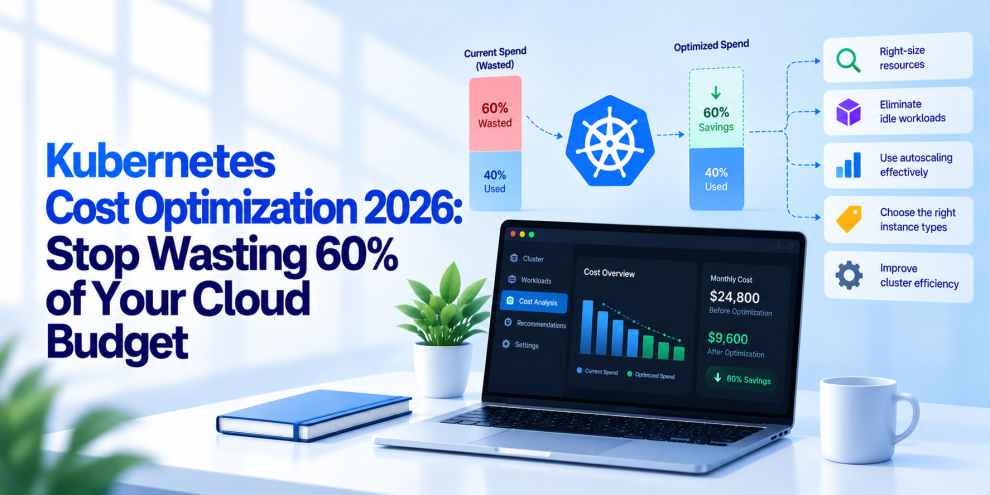

Kubernetes makes it easier to scale applications, distribute workloads, and manage infrastructure across environments. But that flexibility comes with a cost. Teams can end up paying for idle nodes, oversized containers, inefficient autoscaling, unused storage, and workloads that consume more resources than they actually need.
The problem is that Kubernetes does not automatically optimize cloud spending. It schedules workloads according to resource requests, constraints, and available capacity, but it does not inherently know whether an application genuinely needs the resources it has been allocated or whether a more economical configuration would meet its performance requirements.
For engineering leaders managing large cloud environments, this can create a significant gap between infrastructure spending and actual business value. Kubernetes cost optimization in 2026 is therefore about more than reducing compute capacity. It requires connecting resource utilization, workload performance, autoscaling, cloud pricing, and engineering accountability.
The goal is not simply to make Kubernetes cheaper. It is to eliminate waste without compromising reliability, availability, or application performance.
Why Kubernetes Costs More Than Expected
Kubernetes infrastructure costs are distributed across several layers. Compute instances provide the underlying capacity, while containers consume allocated CPU and memory. Persistent volumes store application data, load balancers route traffic, and network services move data between workloads and external systems. Monitoring, logging, and data transfer can add further expenses.
The difficulty is that these costs do not always align with actual utilization.
A cluster may have sufficient aggregate capacity but still require additional nodes because resource requests are too high or workloads cannot be packed efficiently. A service may request several CPU cores but use only a fraction of them most of the time. A deployment may maintain replicas around the clock even when demand falls significantly overnight.
These problems become harder to identify as organizations add clusters, teams, environments, and microservices.
Common sources of Kubernetes cost waste include:
- Overprovisioned workloads: CPU and memory requests exceed realistic requirements.
- Idle infrastructure: Nodes remain available without enough useful work to justify their cost.
- Poor autoscaling: Capacity increases too quickly or fails to decrease when demand falls.
- Inefficient scheduling: Resource requests and placement constraints prevent effective bin packing.
- Unnecessary replicas: Applications maintain more instances than their availability and traffic requirements demand.
- Storage waste: Unused persistent volumes and oversized disks continue generating charges.
- Observability overhead: Excessive log ingestion, metrics cardinality, and long retention periods increase platform costs.
- Data transfer charges: Cross-zone and cross-region traffic creates additional expenses.
No single optimization addresses all these problems. Effective cost reduction starts with identifying which resources are consuming money and why.
1. Fix CPU and Memory Requests Before Adding More Nodes
Resource requests are among the most important inputs to Kubernetes scheduling. They tell the scheduler how much CPU and memory a container requires for placement decisions. CPU limits and memory limits serve different purposes by controlling how much of those resources a container can consume.
When requests are consistently too high, workloads occupy more schedulable capacity than they actually need. The cluster may then require additional nodes even though existing workloads use only a small portion of their allocated resources.
Consider a service that requests one full CPU core but typically consumes 150 millicores. If that pattern appears across dozens of services, the difference between requested and consumed capacity can become substantial.
The solution is not to set every request as low as possible. Requests that are too low can cause poor scheduling decisions, CPU contention, memory pressure, and instability.
Instead, teams should use historical usage data to establish realistic requests and limits. Analyze normal traffic, peak demand, batch workloads, deployment periods, and seasonal patterns before changing production configurations.
For CPU, monitor sustained usage, throttling, and latency. For memory, examine working sets, peak consumption, out-of-memory terminations, and workload-specific behavior.
A useful optimization process is to identify workloads with persistent overprovisioning, adjust their requests gradually, and validate performance after each change. Tools such as Kubernetes Vertical Pod Autoscaler can help recommend or adjust resource requests, depending on the chosen configuration and operational requirements.
The principle is straightforward: allocate resources according to measured workload behavior, not outdated assumptions.
2. Use Cluster Autoscaling and Workload Autoscaling Together
Kubernetes has multiple autoscaling mechanisms, and they solve different problems.
The Horizontal Pod Autoscaler (HPA) adjusts the number of pod replicas based on metrics such as CPU utilization or custom metrics. The Vertical Pod Autoscaler (VPA) helps recommend or manage resource requests for individual workloads. Cluster Autoscaler can adjust the number of nodes when pods cannot be scheduled or when nodes are eligible for removal. Karpenter can provision and consolidate node capacity based on workload requirements in supported environments.
These mechanisms work best when configured as part of a coordinated strategy.
Imagine an application that experiences heavy traffic during business hours and substantially lower demand overnight. HPA can reduce the number of replicas as demand falls. Cluster-level provisioning can then remove nodes that are no longer needed, provided the remaining workloads can be scheduled safely.
Without this coordination, teams may reduce pod counts but continue paying for excess node capacity.
Autoscaling also needs sensible minimums and maximums. An aggressively configured HPA can create too many replicas, while restrictive limits can prevent an application from handling traffic spikes. Poorly configured scale-down behavior can also leave expensive capacity running longer than necessary.
For production systems, autoscaling policies should account for workload metrics, startup time, traffic variability, disruption budgets, and the time required to provision new nodes.
3. Improve Bin Packing With Better Scheduling
Bin packing refers to placing workloads on available nodes in a way that uses capacity efficiently without violating resource requirements or operational constraints.
Poor bin packing can leave many partially utilized nodes running simultaneously. This is especially common when teams use oversized resource requests, strict affinity rules, unnecessary topology constraints, or a large number of small workloads.
Improving bin packing starts with understanding how workloads are distributed across the cluster.
Review node utilization, pod placement, resource requests, affinity and anti-affinity rules, taints, tolerations, and topology spread constraints. Some placement rules are essential for availability, but unnecessarily restrictive rules can fragment capacity and force additional nodes to remain active.
Node consolidation can help move workloads onto fewer machines, allowing underutilized nodes to be removed. However, consolidation should respect availability requirements, disruption budgets, workload priorities, and maintenance constraints.
Karpenter, where supported, can help provision and consolidate capacity according to workload requirements. Cluster Autoscaler provides another option for environments that use compatible node groups.
The objective is not to maximize node utilization at all costs. Running every node close to capacity can increase contention and reduce resilience. The objective is to achieve efficient packing while preserving enough headroom for reliable operation.
4. Choose the Right Compute Instances
Not every Kubernetes workload needs the same type of infrastructure.
CPU-intensive applications, memory-heavy services, latency-sensitive APIs, and batch processing jobs have different resource profiles. Running all of them on a single general-purpose node type can leave performance or cost efficiency on the table.
A more deliberate approach uses node pools or provisioning policies that match compute capacity to workload requirements.
For example, memory-intensive applications may benefit from memory-optimized instances, while compute-heavy workloads may perform better on compute-optimized machines. Development and testing workloads may fit lower-cost instance families, subject to performance requirements.
Teams can also evaluate cloud-provider discounts, including committed-use arrangements, savings plans, and reserved capacity where available. Spot instances can reduce costs for suitable interruptible workloads, but applications must tolerate interruption and recover safely.
Before moving a workload to cheaper infrastructure, benchmark its performance and understand its availability requirements. A lower hourly instance price does not necessarily produce a lower total cost if the workload requires more machines or suffers from degraded performance.
5. Treat Spot Instances as a Workload Strategy
Spot instances can be useful for reducing compute costs, particularly for fault-tolerant batch processing, CI runners, development environments, and stateless workloads that can recover from interruptions.
They are not a universal replacement for stable capacity.
A production cluster that relies entirely on interruptible instances may experience disruption when capacity is reclaimed. Stateful applications and workloads with strict availability requirements need additional care.
A practical approach is to separate workloads according to their tolerance for interruption. Keep suitable baseline capacity on more stable instances, then use spot capacity for workloads that can be rescheduled or retried.
Use multiple eligible instance types and availability zones where the platform supports it. Configure graceful termination handling, workload disruption budgets, and retry mechanisms. Ensure that critical services can continue operating when spot capacity becomes unavailable.
This approach allows teams to benefit from lower-cost compute without treating availability as an acceptable trade-off.
6. Stop Paying for Unused Storage and Data Transfer
Compute is only one part of a Kubernetes bill.
Persistent volumes can continue generating charges after applications have been removed. Development environments may accumulate old disks, snapshots, and unattached volumes. Storage classes may also provision more expensive capacity than workloads require.
Teams should inventory persistent volumes, identify unattached or abandoned resources, review retention policies, and match storage performance to application needs. Deletion policies require particular care because removing a Kubernetes resource does not always mean the underlying cloud storage will be deleted, and deleting the wrong volume can cause data loss.
Networking deserves similar attention. Cross-zone traffic, cross-region replication, NAT gateways, load balancers, and data egress can become significant expenses in distributed applications.
Review traffic patterns between services and regions. Where appropriate, reduce unnecessary data movement, improve caching, and reconsider service placement. Do not sacrifice fault isolation or geographic resilience merely to reduce transfer charges.
The important step is to connect infrastructure costs to the actual data paths and storage lifecycles of applications.
7. Optimize Logging and Observability Costs
Observability is essential for operating Kubernetes reliably, but telemetry can become a significant cost center.
Applications often generate verbose logs, duplicate events, high-cardinality metrics, and traces that are retained longer than their operational value justifies. At scale, the cost of ingesting, processing, and storing this data can grow quickly.
Start by identifying the most expensive telemetry sources. Determine which services produce the largest log volumes, which metrics generate excessive time-series cardinality, and which datasets require long retention for compliance or incident investigation.
Then establish policies based on operational value.
Debug logs may need short retention or limited production sampling. Security and audit records may require stricter retention and access controls. Metrics used for critical alerts should remain available, while redundant measurements can often be removed. Trace sampling can reduce volume, provided error and high-latency investigations retain sufficient coverage.
Avoid indiscriminate sampling of security-critical events or telemetry required for regulatory obligations.
The goal is to preserve the signals engineers need to detect and investigate problems while eliminating unnecessary ingestion and retention.
8. Use FinOps to Connect Infrastructure Costs to Engineering Decisions
Kubernetes cost optimization becomes difficult when finance teams see a single cloud invoice and engineering teams see dozens of clusters, namespaces, and applications.
FinOps helps connect those views by making infrastructure spending visible and attributable.
Start with consistent resource labels and tags for applications, teams, environments, and business units. Use cloud billing data and Kubernetes cost-allocation tools to estimate the cost of namespaces, workloads, and services. Then compare those costs with operational metrics such as request volume, service availability, and workload throughput.
For example, a service that costs more each month may be handling increased demand, or it may simply be running unnecessary replicas. Cost data alone cannot distinguish those cases, but cost data combined with workload metrics can.
Establish budgets and alerts for unexpected spending increases. Review idle resources, cost per environment, and the financial impact of major deployments. Give teams visibility into the consequences of their resource decisions without encouraging them to compromise reliability to meet a budget target.
Kubernetes cost optimization should be a continuous engineering practice, not a one-time cleanup exercise.
9. Use Rightsizing Recommendations Carefully
Cost-management platforms can identify underutilized workloads, recommend resource requests, highlight idle infrastructure, and estimate potential savings. Kubernetes-focused tools such as Kubecost and OpenCost can help teams understand resource allocation and cost distribution, while cloud-provider tools provide billing and pricing context.
However, recommendations are only as reliable as the data and assumptions behind them.
A workload that uses little CPU during normal hours may still need substantial capacity during scheduled peaks. A memory-intensive process may have infrequent but important spikes. A service that appears idle may be required for disaster recovery or a critical background task.
Before applying recommendations, examine the measurement window, peak usage, service-level objectives, and consequences of resource reduction. Test changes in lower environments where possible, then roll them out progressively.
Automated rightsizing can be valuable, but production changes should include validation, monitoring, and a rollback path.
10. Build Cost Controls Into CI/CD
Infrastructure waste often begins with a configuration change.
A developer increases a resource request, adds replicas, creates a new environment, or introduces a persistent volume. The change passes functional tests, but nobody evaluates its cost impact. Over time, individually reasonable decisions can create a much larger infrastructure bill.
CI/CD pipelines can help prevent this by checking Kubernetes manifests and infrastructure configurations before deployment.
Teams can enforce policies for resource requests and limits, replica counts, approved node pools, storage classes, and environment-specific configuration. Pull requests can include cost estimates for infrastructure changes when suitable tooling is available.
Policies should account for application criticality and workload type rather than imposing identical thresholds on every service. A latency-sensitive payment API and a temporary batch job have different requirements.
Cost checks should also complement security and reliability checks. The cheapest configuration is not acceptable if it introduces an outage, weakens isolation, or violates a service-level objective.
11. Measure Cost Per Transaction, Not Just Cost Per Cluster
A lower monthly cloud bill is useful, but it does not necessarily mean the platform has become more efficient.
If infrastructure spending falls while traffic increases and reliability remains stable, the platform has likely improved its cost efficiency. If spending falls because applications have become slower or less available, the apparent savings may be misleading.
Engineering teams should therefore track business-relevant unit economics alongside total spending.
Depending on the application, useful measures include cost per API request, cost per transaction, cost per customer, cost per batch job, or cost per unit of data processed.
For example, a payments platform might compare infrastructure cost per successfully processed transaction over time. A sudden increase could reveal overprovisioning, inefficient application behavior, or a change in traffic patterns.
These metrics help leaders understand whether optimization is improving the economics of the service rather than merely reducing its resource allocation.
A Practical Kubernetes Cost Optimization Plan
Teams do not need to change every part of their cluster at once. A phased approach makes it easier to identify savings and avoid operational regressions.
First 30 days: Establish visibility. Review cloud billing, identify idle resources, analyze CPU and memory requests, inspect storage usage, and establish a baseline for cost per workload or transaction.
Days 31 to 60: Optimize the biggest inefficiencies. Rightsize overprovisioned workloads, review autoscaling policies, consolidate suitable nodes, clean up abandoned storage, and reduce unnecessary telemetry ingestion.
Days 61 to 90: Automate and govern. Introduce cost-aware CI/CD checks, establish team-level budgets, review node provisioning policies, evaluate suitable spot capacity, and create recurring cost and reliability reviews.
Measure each change against the baseline. Track spending, performance, error rates, availability, and resource utilization so that cost reductions do not conceal operational problems.
Where Engineering Partners Add Value
Kubernetes cost optimization involves more than changing cloud settings. It requires understanding application behavior, resource allocation, cluster architecture, autoscaling, observability, deployment practices, and reliability requirements.
Engineering partners such as GeekyAnts help organizations assess Kubernetes environments, identify infrastructure inefficiencies, modernize cloud-native applications, and build cost-aware DevOps practices. The value lies in connecting infrastructure decisions to application performance and operational requirements, rather than pursuing savings in isolation.
The Real Goal Is Sustainable Cloud Efficiency
Kubernetes can make infrastructure flexible, but flexibility without governance can lead to unnecessary spending. Oversized resource requests, idle nodes, inefficient autoscaling, abandoned storage, and excessive telemetry can all increase costs without improving the application experience.
The most effective optimization strategy combines workload rightsizing, coordinated autoscaling, efficient scheduling, appropriate compute choices, storage and network reviews, observability controls, and continuous cost accountability.
Can every organization eliminate 60% of its Kubernetes spending? No. The opportunity depends on how much waste already exists, the workloads involved, and the changes the business can safely make. Some environments may have substantial opportunities, while others are already relatively efficient.
The objective is to find the waste that actually exists, measure the impact of removing it, and preserve the reliability users depend on.
In 2026, the strongest Kubernetes platforms will not simply run more workloads on more infrastructure. They will make resource consumption visible, align capacity with demand, and give engineering teams the tools to make cost-aware decisions without compromising production.
For more, visit our homepage!




Add Comment