








A familiar problem in DevOps is that software works perfectly on one machine and fails on another. A developer’s laptop has the correct dependencies, a CI runner uses a slightly different package version, and production runs a different system library. The application code may be identical, but the environments are not.
Containers, infrastructure as code, and configuration management have reduced this problem, but they have not eliminated it. Dependencies can still change, package versions can drift, build tools can behave differently across environments, and configuration files can become difficult to maintain.
This is where Nix offers a different approach. Instead of relying primarily on manually configured environments or mutable system packages, Nix uses declarative definitions and a functional package management model to make software environments more reproducible. In 2026, as engineering teams manage increasingly complex CI/CD pipelines, multi-service applications, and cloud-native infrastructure, Nix is worth understanding as a tool for improving consistency across development, testing, and production workflows.
The goal is not simply to install software reliably. It is to make the process that creates an environment predictable, repeatable, and easier to audit.
Why Reproducibility Remains a DevOps Problem
Modern DevOps teams have invested heavily in automation. Infrastructure can be provisioned through Terraform, applications can be packaged into containers, and CI/CD systems can execute standardized build and deployment workflows.
Yet a pipeline can still produce inconsistent results.
A build may depend on the version of a compiler installed on the runner. A Python application may resolve a different dependency version after an environment is recreated. A developer may have a command-line tool that is missing from the CI environment. A container image may include system libraries that differ from those used during local testing.
These differences create several problems:
- Builds that succeed locally but fail in CI.
- Unexpected changes after dependency updates.
- Difficult-to-reproduce production incidents.
- Slow onboarding because developers must configure their machines manually.
- Inconsistent environments across teams and repositories.
- Increased effort when investigating software supply-chain issues.
Pinning application dependencies helps, but it does not necessarily pin every tool, system library, compiler, or build-time dependency involved in creating the final artifact.
Reproducibility requires controlling the environment that builds the software, not just the application dependencies.
What Is Nix?
Nix is a package manager and build system built around functional principles. It can also be used as the foundation for declarative system configurations through NixOS.
Traditional package managers commonly install or update software within a shared system environment. Nix takes a different approach by storing packages in an isolated store, typically under /nix/store, with paths derived from the package’s build inputs and other relevant dependencies.
This helps prevent unrelated package installations from silently changing one another’s environments.
Nix also allows teams to describe development environments and build processes declaratively. Instead of asking every developer to install a collection of tools manually, a repository can define the tools required for a project.
A developer can then enter that environment using the Nix tooling supported by the project.
The result is a more explicit relationship between a project’s configuration and the environment in which it runs.
How Nix Makes Builds More Reproducible
Nix uses derivations to describe how packages and other build outputs should be produced. A derivation defines information such as the build inputs, commands, environment, and expected outputs.
The Nix build system uses this information to construct a dependency graph and determine which outputs need to be built or reused.
Because packages are stored separately and build inputs can be pinned, teams can reduce accidental variation between environments.
For example, a Node.js backend might require a specific Node.js release, a particular package manager, a compiler, and a set of native libraries. Rather than relying on whatever happens to be installed on a developer’s machine, a Nix configuration can declare the required tools.
The same configuration can then be used by developers and CI runners.
There is an important distinction, however: Nix improves reproducibility, but a Nix configuration does not automatically guarantee a byte-for-byte identical build in every situation. Build scripts may still depend on timestamps, network access, undeclared inputs, platform differences, or nondeterministic operations. Teams need to control those factors as well.
Nix Flakes: Pinning the Development Environment
One of the most useful Nix features for modern development workflows is the flake system.
A flake provides a structured way to define Nix projects and their inputs and outputs. Its lock file can pin the revisions of external inputs, helping teams avoid silently changing dependencies when configurations are evaluated at different times.
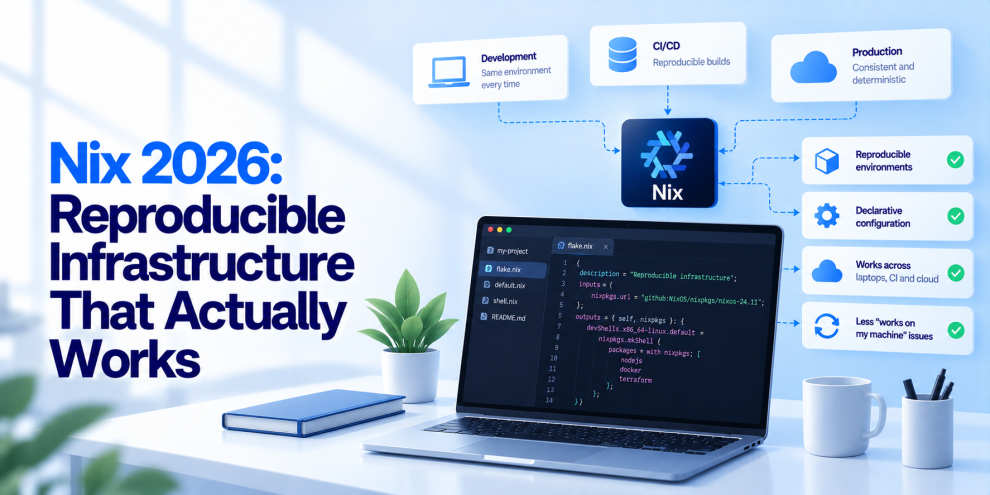
Consider a repository that defines a development environment using flake.nix and commits the corresponding flake.lock file. Developers and CI can use the pinned inputs rather than independently resolving potentially different versions.
A simplified example looks like this:
{
  description = "Backend development environment";

  inputs.nixpkgs.url =
    "github:NixOS/nixpkgs/nixos-unstable";

  outputs = { self, nixpkgs }:
    let
      system = "x86_64-linux";
      pkgs = import nixpkgs { inherit system; };
    in {
      devShells.${system}.default = pkgs.mkShell {
        packages = with pkgs; [
          nodejs
          git
          curl
        ];
      };
    };
}
This example declares a development shell containing Node.js, Git, and curl. In a real repository, the team would generate and commit flake.lock, choose an appropriate supported package source, and account for the operating systems and architectures it needs to support.
Developers with compatible Nix installations can enter the environment using:
nix developThe command makes the declared tools available within the development shell without requiring the project to manage each tool through ad hoc installation instructions.
For a team working across multiple backend services, the same pattern can establish a consistent baseline for local development, automated testing, and build preparation.
Nix vs Docker: Different Problems, Complementary Tools
Nix and Docker are sometimes discussed as alternatives, but they solve different parts of the environment problem.
Docker packages an application and its runtime environment into a container image. Nix describes and builds software environments using declarative package definitions and controlled inputs.
A container can still be built using Nix, and Nix-built artifacts can be deployed through container-based platforms. The two approaches can complement each other.
| Capability | Nix | Docker |
|---|---|---|
| Primary purpose | Reproducible package and environment management | Container packaging and runtime isolation |
| Dependency handling | Declarative package definitions and isolated store paths | Dependencies included in the image or supplied at runtime |
| Development environments | Can define project-specific shells | Can provide development containers |
| Deployment | Can build packages, system configurations, and artifacts | Commonly packages applications for deployment |
| Environment consistency | Helps pin and control build inputs | Helps standardize the packaged runtime environment |
| Main limitation | Learning curve and platform-specific configuration | Image builds can still be non-reproducible if inputs are uncontrolled |
A Dockerfile that installs an unpinned package from a mutable repository may produce different images at different times. Using Nix to define and pin relevant dependencies can help address that issue.
However, Docker still provides container isolation, image distribution, and deployment integration that Nix does not replace by itself.
For many DevOps teams, the most practical architecture is to use Nix to control build inputs and development environments, then use Docker or another deployment format to package and run the application.
Nix and CI/CD: Making Build Environments Consistent
CI/CD pipelines are among the strongest use cases for Nix.
A pipeline typically depends on a runner image, operating-system packages, language runtimes, package managers, build tools, and environment variables. If these inputs are not controlled, the pipeline can change even when the application repository has not.
Nix allows teams to define the tools and dependencies required for build and test jobs alongside the source code.
A simplified workflow might look like this:
Source repository → Pinned Nix inputs → Reproducible build environment → Tests → Artifact creation → Artifact verification → Deployment
This makes the build environment easier to review and reproduce.
For example, a backend team can define the Node.js version and native build tools in Nix, use that environment to run tests, and create a container image from the resulting application. The CI runner no longer needs to depend on manually installed versions of those tools.
Nix can also help reduce setup drift between local development and CI. Developers can reproduce the same declared toolchain instead of relying on a separate document listing installation commands.
Nix does not replace CI/CD orchestration tools such as GitHub Actions, GitLab CI, or Jenkins. Those tools still manage workflow execution, permissions, triggers, artifacts, and deployment steps. Nix helps make the environment used by those workflows more controlled.
Using Nix for Multi-Service Repositories
Monorepos and multi-service applications create another challenge: different services may require different toolchains.
One service may use Node.js, another Python, and a third Go. A shared runner image can become bloated with multiple runtimes and conflicting versions.
Nix can define separate development shells for individual services or expose a shared set of outputs for the repository.
For example, a project might provide:
- A Node.js shell for the API.
- A Python shell for data processing.
- A Go shell for a supporting service.
- A common shell for formatting, linting, and repository-wide checks.
This makes the development setup more explicit and reduces the need for every engineer to configure the entire technology stack locally.
It can also help standardize onboarding. Instead of following a long series of installation steps, a new developer can install the required tooling and enter the appropriate project environment.
For larger organizations, teams should still establish conventions for maintaining shared Nix expressions, updating dependencies, reviewing lock-file changes, and supporting different operating systems.
NixOS: Extending Declarative Configuration to the System
Nix is not limited to development shells and application packages. NixOS uses the Nix ecosystem to define operating-system configurations declaratively.
Rather than relying entirely on a sequence of manual configuration changes, teams can describe system packages, services, users, and other supported settings in configuration files.
This can make system configuration easier to review and reproduce. It also supports a workflow in which a configuration change is evaluated and built before being applied.
NixOS provides generation-based system management and rollback capabilities, which can be valuable for systems where predictable configuration changes matter.
However, NixOS is not a drop-in replacement for every Linux distribution. Organizations need to evaluate compatibility with their cloud images, management tools, hardware, security requirements, and operational practices before adopting it for production infrastructure.
Teams can gain value from Nix package management and development environments without migrating their servers to NixOS.
Nix and Software Supply-Chain Security
Reproducibility is also relevant to software supply-chain security.
When teams can identify the dependencies and build inputs used to create an artifact, they have a stronger foundation for investigating unexpected changes. Pinned inputs can reduce accidental dependency drift, while isolated package storage helps prevent unrelated installations from interfering with one another.
But Nix should not be treated as a complete supply-chain security solution.
A pinned dependency can still contain a vulnerability. A trusted source can become compromised. A malicious build script can misuse credentials available to it. A reproducible build can reproduce an insecure result consistently.
Production pipelines should therefore combine Nix with dependency review, vulnerability scanning, secret isolation, restricted build permissions, artifact signing, provenance generation, and controlled release processes.
Organizations should also avoid allowing build jobs to access secrets they do not need. Reproducibility and least privilege address different risks and should be implemented together.
Caching and Build Performance
Nix can improve build efficiency by reusing existing outputs when the required derivations and their inputs match. Binary caches can also allow teams to download already-built packages rather than compiling every dependency locally.
This can be particularly useful for large projects with expensive native dependencies or multiple CI jobs that use the same toolchain.
However, caching is not automatically a performance improvement in every workflow. Cache misses, large downloads, remote cache latency, storage requirements, and platform-specific builds can affect results.
Teams should measure build duration, cache hit rates, download volume, and storage costs before deciding how to operate shared caches.
Private or organization-managed caches also need appropriate access controls. Teams should understand which artifacts can be published, who can consume them, and how trust in cached outputs is established.
The Learning Curve Is Real
Nix offers substantial control, but it introduces concepts that may be unfamiliar to engineers accustomed to conventional package managers and container workflows.
Teams need to understand expressions, derivations, package inputs, lock files, build phases, and the distinction between reproducible configuration and fully hermetic builds.
Debugging can also require a different approach. A build that depends on undeclared system tools or attempts to download dependencies during execution may fail when Nix’s isolation exposes those assumptions.
A successful rollout should therefore start with a limited, useful scope.
A team could begin by defining a development shell for one backend service, pinning the required inputs, and using the same environment in CI. After measuring the benefits, it can extend the approach to additional services, shared tooling, container builds, or system configuration.
The goal is not to introduce Nix everywhere immediately. It is to eliminate meaningful sources of environment drift without adding unnecessary operational complexity.
When Nix Is the Right Choice
Nix is particularly useful when teams need consistent development environments, controlled build inputs, complex native dependencies, multiple language toolchains, or repeatable CI execution.
It can also be attractive for organizations that want to manage infrastructure configuration declaratively and make build processes easier to inspect.
Nix may be less suitable when a team has very simple build requirements, depends heavily on tools that are difficult to package, or lacks the time to establish and maintain Nix expertise. In some environments, containers and conventional package managers may already provide an adequate level of consistency.
The decision should be based on measurable problems: repeated environment failures, slow onboarding, dependency drift, difficult-to-reproduce builds, or expensive CI setup.
If those problems are rare, a Nix migration may offer limited value. If they regularly disrupt delivery, a controlled pilot can help determine whether Nix improves reliability enough to justify its learning curve.
Where Engineering Teams Fit
Adopting reproducible infrastructure requires more than choosing a package manager. Engineering teams need to align development environments, CI/CD workflows, container builds, dependency management, security controls, and release practices.
Teams like GeekyAnts, Thoughtworks work across application engineering, backend systems, and modern development infrastructure, making this broader engineering perspective relevant for teams evaluating tools such as Nix. The objective is to build delivery workflows where environments are easier to reproduce, configuration changes are easier to review, and production releases are supported by consistent engineering practices.
Building a Practical Nix Adoption Plan
For DevOps teams considering Nix in 2026, a phased adoption plan is usually more effective than a complete tooling migration.
Start with one service that frequently experiences environment drift. Define its development shell and pin its inputs. Ensure that local development and CI use the same toolchain. Measure setup time, build failures, cache effectiveness, and maintenance overhead.
Next, introduce the configuration through normal code review. Establish ownership for dependency updates, document how lock files are maintained, and define how developers can reproduce CI failures locally.
Once the workflow is stable, evaluate whether Nix should also manage container build inputs, shared developer tools, or additional repositories.
At each stage, assess the result against a concrete baseline. A successful implementation should reduce environment-related failures and improve repeatability without making routine development harder.
The Future of Reproducible DevOps
DevOps maturity is not measured only by how quickly a pipeline runs. It also depends on whether teams can reliably reproduce a build, understand the inputs that produced an artifact, and investigate unexpected differences between environments.
Nix provides a distinctive approach to this problem through declarative environments, isolated package storage, pinned inputs, and a build model designed around explicit dependencies.
It does not eliminate every source of nondeterminism, replace container orchestration, or automatically secure a software supply chain. Its value comes from making important parts of the development and build environment more explicit and controllable.
For teams struggling with dependency drift, inconsistent CI runners, and fragile developer setups, Nix can be a practical step toward more reproducible software delivery.
The real objective is straightforward: a build should not depend on undocumented assumptions about the machine that happens to run it. When teams can define, review, and reproduce the environment that creates their software, debugging becomes easier, onboarding becomes more predictable, and the delivery pipeline becomes a stronger foundation for production reliability.
For more, visit our homepage!





Add Comment