



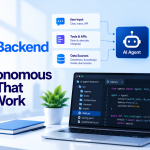


AI agents are moving beyond chat interfaces into real engineering workflows. They can inspect code repositories, query databases, retrieve internal documentation, interact with cloud services, investigate incidents, and assist with CI/CD operations. But every integration introduces another engineering challenge: connecting AI systems to tools and data sources without creating a fragmented, difficult-to-secure architecture.
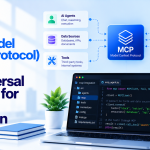
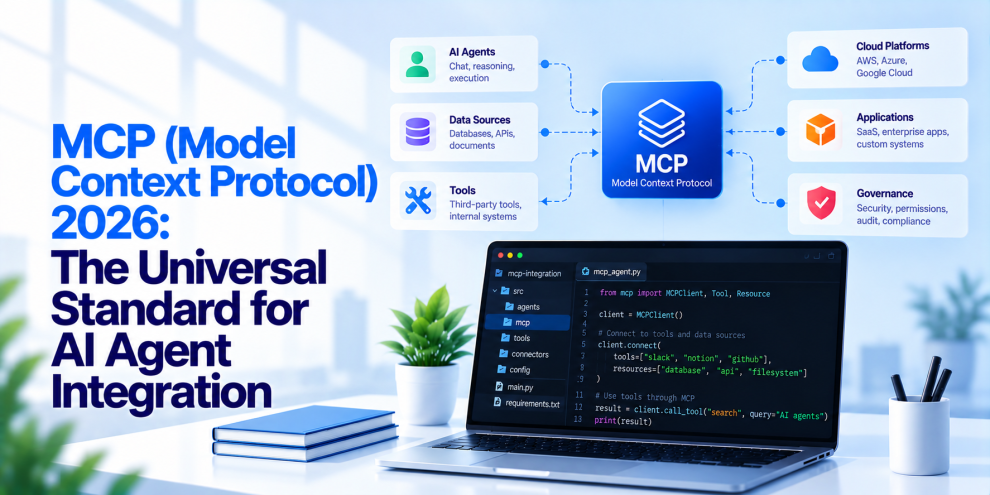
This is where the Model Context Protocol (MCP) becomes important. MCP provides a standardized way for AI applications to connect with external tools, resources, and services. Instead of building a separate integration for every combination of model, application, and backend system, developers can use a common protocol to expose capabilities through compatible clients and servers.
For DevOps teams, this creates an opportunity to simplify AI integration across development environments, infrastructure platforms, observability systems, and delivery pipelines. However, adopting MCP is not just a connectivity decision. Production implementations also need authentication, authorization, tool-level controls, observability, version management, and safeguards against unintended actions.
The real value of MCP is not simply connecting an AI agent to more systems. It is making those connections more consistent, manageable, and secure.
Why AI Agent Integration Needs a Standard
Before standardized protocols became available, integrating an AI application with an external service often required custom logic. A team building an agent for incident response might need separate integrations for Kubernetes, its monitoring platform, a ticketing system, source control, and deployment tooling.
Each integration could have its own authentication method, request format, error handling, and permission model. Adding another model or agent framework could require additional integration work.
This creates several problems:
- Duplicate integration code across applications.
- Inconsistent authentication and authorization practices.
- Difficult maintenance as APIs and tools evolve.
- Limited portability between AI clients and backend systems.
- Increased testing and operational overhead.
- More opportunities for security mistakes.
MCP addresses the integration layer by defining a common protocol through which compatible clients can discover and use server-exposed capabilities.
The underlying services do not need to be replaced. Instead, MCP can provide a standardized interface between AI applications and existing systems.
What Is the Model Context Protocol?
The Model Context Protocol is an open protocol designed to connect AI applications with external data sources, tools, and contextual information.
An MCP-based architecture generally involves three components.
MCP host: The AI application that manages the interaction and decides how MCP capabilities fit into the broader workflow.
MCP client: The component within the host that communicates with an MCP server using the protocol.
MCP server: The component that exposes specific capabilities, such as retrieving documentation, searching logs, accessing approved repository information, or invoking a permitted operation.
An MCP server may connect to an existing API, database, internal service, or developer tool. It provides a consistent interface without requiring the underlying system to become an AI application itself.
MCP commonly exposes three types of capabilities:
- Tools: Operations the model can request, such as searching logs or creating an issue.
- Resources: Contextual data that an application can retrieve, such as documentation or configuration information.
- Prompts: Reusable prompt templates that can support specific workflows.
These capabilities are distinct from the model itself. MCP standardizes how the application interacts with them, but it does not guarantee that a model will choose the correct tool or produce a reliable result.
That responsibility remains with the application architecture, tool implementation, and surrounding control systems.
How MCP Changes DevOps Architecture
DevOps environments are particularly well suited to standardized integrations because engineering teams rely on many interconnected systems.
A typical environment might include GitHub or GitLab, Kubernetes, cloud infrastructure, CI/CD pipelines, monitoring platforms, incident-management tools, and internal documentation.
An AI assistant may need to consult several of these systems to answer a single question.
For example, an engineer investigating a failed deployment might ask an agent to identify the cause of a recent production incident. The agent could retrieve deployment history, inspect relevant logs, query service health, review a recent code change, and summarize the likely failure.
Without a standardized integration layer, each connection may require custom implementation. With MCP, compatible clients can communicate with servers that expose the necessary capabilities through a common protocol.
A simplified architecture looks like this:
AI Application → MCP Client → MCP Server → Existing DevOps Tools and Services
The MCP server might expose a restricted set of operations rather than giving the agent unrestricted access to an entire platform.
This allows teams to preserve existing infrastructure while introducing a consistent integration model for AI-assisted operations.
MCP Use Cases Across the DevOps Lifecycle
MCP becomes more useful when it is applied to specific engineering workflows rather than treated as a general-purpose AI connector.
1. Incident Investigation
An AI agent can use approved MCP tools to retrieve metrics, search logs, inspect traces, and review recent deployment events.
It can correlate evidence from multiple systems and produce a structured incident summary. Engineers can then use that information to investigate the underlying cause.
The agent should distinguish observed facts from hypotheses. Access to several monitoring systems does not automatically establish causation.
2. CI/CD Pipeline Assistance
An MCP server can expose pipeline status, build logs, test results, and deployment history.
An agent could identify failed stages, summarize recurring errors, compare recent runs, or suggest a correction to a workflow.
Production deployment permissions should remain separate from diagnostic access. An agent that can read a failed pipeline does not necessarily need permission to rerun it or deploy a new artifact.
3. Kubernetes Operations
MCP can provide a standardized interface to selected Kubernetes information and operations.
For example, an agent might inspect pod status, retrieve events, summarize resource pressure, or identify workloads with repeated restarts.
Read-only access is a sensible starting point. Operations that modify workloads, scale services, change configuration, or delete resources should require stricter controls.
4. Infrastructure as Code
Infrastructure teams can expose approved capabilities around Terraform plans, configuration repositories, policy checks, and infrastructure documentation.
An agent might explain a proposed change, identify potentially risky resource modifications, or summarize a plan before an engineer reviews it.
However, generating or reviewing infrastructure code is different from applying it. Production changes should continue through controlled approval and deployment workflows.
5. Developer Productivity
MCP can connect AI assistants to source repositories, issue trackers, documentation, code review systems, and internal engineering knowledge.
Developers can ask questions about service ownership, locate relevant implementation details, retrieve existing design decisions, or summarize open issues without manually switching between systems.
The value depends on the quality of the underlying integrations, access controls, and information exposed through each server.
MCP Is Not an AI Agent Framework
One common misconception is that adopting MCP automatically creates an autonomous agent.
It does not.
MCP defines a way for compatible components to exchange information and invoke exposed capabilities. It does not independently provide planning, long-term memory, durable workflow execution, retry management, or business-level decision-making.
Those responsibilities belong to the host application and the systems surrounding it.
For example, an agent that investigates an incident and proposes a rollback needs more than an MCP connection. It also needs access to reliable telemetry, dependency information, authorization policies, execution state, and a mechanism for verifying the result.
MCP can connect the relevant tools, but the application must determine how to use them safely.
This distinction is important when designing production systems. A protocol can standardize integration without standardizing the quality of the decisions made through that integration.
Security: The Most Important Part of MCP Adoption
MCP expands the ways an AI application can interact with external systems. That makes its security architecture a critical consideration.
A poorly configured server can expose sensitive information or provide an agent with capabilities that exceed the intended scope of the workflow.
DevOps teams should therefore treat MCP servers as security-sensitive integration components.
Apply Least Privilege
Every MCP server should expose only the capabilities required for its intended use.
A monitoring integration may need permission to read metrics and logs. It does not automatically need permission to restart production workloads.
A repository integration may need access to a specific project rather than every repository in the organization.
Permissions should be scoped by user, service identity, environment, resource, and operation wherever practical.
Authenticate and Authorize Every Request
Authentication establishes the identity of the caller. Authorization determines what that identity is permitted to do.
These checks should be enforced by the MCP server and the underlying service, not delegated to the language model.
A tool call requesting sensitive information should be checked against the current user’s permissions and the application’s security policies. Previous conversation context or a model-generated explanation should never serve as proof of authorization.
Teams should also avoid treating a connection to an MCP server as permission to access everything that server can reach.
Protect Credentials
MCP integrations may interact with source repositories, cloud platforms, monitoring systems, and internal APIs.
Credentials should be stored using appropriate secret-management systems and supplied only to components that require them. Tokens should have narrow scopes, suitable expiration periods, and rotation procedures.
Credentials should not be placed in prompts, tool descriptions, resource content, or unrestricted logs.
Validate Tool Inputs
Tool arguments generated by an LLM should be treated as untrusted input.
MCP servers should validate argument types, allowed values, resource identifiers, request size, and operation-specific constraints. They should also enforce timeouts, rate limits, and safe error handling.
For high-impact operations, validation may need to include a policy check, approval requirement, or confirmation step before execution.
The model can request an operation. The server must determine whether the operation is allowed.
Prompt Injection Does Not Disappear With MCP
Standardizing tool integration does not eliminate prompt injection.
An agent may retrieve a malicious document, inspect a compromised repository, or receive an API response containing instructions designed to manipulate its behavior.
If the model treats that content as trusted instructions, it may attempt to use available tools in unintended ways.
MCP implementations should therefore maintain a clear distinction between instructions supplied by the application and untrusted content returned by external systems.
Retrieved documents and tool outputs should not be allowed to override authorization policies or expand the agent’s permissions. Tool descriptions and server configuration should be controlled, and sensitive actions should be validated independently of the model’s interpretation.
The safest approach is defense in depth: limit available tools, restrict access, validate arguments, enforce backend permissions, and monitor unusual behavior.
Remote and Local MCP Servers Require Different Controls
MCP servers can run in different environments, and their deployment model affects the security requirements.
Local servers may execute within a developer’s environment and access local files, tools, or processes. Teams should control which servers can run, review their configuration, and understand the permissions they inherit.
Remote servers may be hosted centrally and accessed over a network. They need appropriate transport security, authentication, authorization, and operational monitoring.
For remote HTTP-based deployments, teams should follow the authentication and security requirements applicable to their MCP implementation and environment. They should not assume that every client or server supports the same authentication model.
In both cases, server identity, credential handling, tool permissions, and access to underlying systems need explicit controls.
Observability for MCP-Based Systems
Traditional DevOps monitoring focuses on application health, infrastructure performance, deployment status, and service availability.
MCP-based AI workflows introduce additional questions. Which tools did the agent discover? Which tools did it invoke? What authorization decision was made? Did the operation succeed? How long did it take? Did the returned information influence a consequential action?
An observability strategy should connect these events with the broader application trace.
Useful signals include:
- MCP request latency and error rates.
- Tool invocation counts and failure categories.
- Authentication and authorization failures.
- Server availability and connection errors.
- Timeout and retry frequency.
- Unusual access patterns.
- High-risk tool execution events.
- Agent task completion and escalation rates.
Logs should capture enough metadata to support investigation without unnecessarily recording complete prompts, credentials, private documents, or sensitive tool payloads.
Where supported, distributed tracing can connect the agent request, MCP interaction, downstream API call, and resulting workflow outcome. This makes it easier to distinguish an AI reasoning problem from an integration or infrastructure failure.
Versioning and Reliability Matter in Production
An MCP server is still a software component. It can fail, change behavior, expose incompatible schemas, or become unavailable when a downstream service is degraded.
Production implementations should therefore include conventional software engineering controls.
Teams should version server implementations and tool schemas, test compatibility with clients, validate inputs and outputs, define timeouts, and handle downstream errors predictably.
Retries should be designed carefully. Repeating a read-only query is usually different from repeating a tool that creates a ticket, changes a configuration, or triggers a deployment.
For operations that can be repeated safely, idempotency controls can prevent duplicate side effects. For non-idempotent operations, the application should verify the outcome before attempting another execution.
MCP standardizes communication, but reliability still depends on how the server and its underlying systems are engineered.
A Practical Roadmap for Adopting MCP in DevOps
Organizations do not need to connect every internal system to an AI agent immediately. A phased approach reduces risk and makes the benefits easier to measure.
Phase 1: Identify a narrow use case. Choose a workflow such as searching deployment logs, retrieving service documentation, or summarizing pipeline failures.
Phase 2: Build a restricted MCP server. Expose a small set of well-defined tools and resources. Prefer read-only capabilities for the first implementation.
Phase 3: Add identity and security controls. Configure authentication, resource-level authorization, input validation, secret handling, and appropriate network restrictions.
Phase 4: Test failure and abuse scenarios. Verify behavior when the server is unavailable, a downstream API times out, an input is malformed, a user lacks permission, or retrieved content contains malicious instructions.
Phase 5: Introduce observability. Track latency, tool failures, access decisions, resource consumption, and task outcomes.
Phase 6: Expand with explicit approval boundaries. Add higher-impact operations only when the use case requires them and the necessary safeguards are in place.
This approach makes it possible to validate MCP’s operational value without granting an agent broad infrastructure access from day one.
Where Engineering Teams Fit
Integrating AI agents into DevOps requires more than connecting a model to existing tools. Teams need backend integration, secure API design, infrastructure knowledge, workflow orchestration, and observability to make those connections useful in production. Teams like GeekyAnts and Thoughtworks work across AI engineering, backend development, and application architecture, making this broader engineering perspective relevant for organizations introducing AI-powered workflows into their development and operations environments.
The objective is to make AI integrations practical while preserving the security and operational controls that production systems require.
The Future of MCP in DevOps
MCP offers a common integration approach for AI applications that need to work with multiple tools and data sources. For DevOps teams, that can reduce the need for one-off integrations and make it easier to connect AI assistants with existing engineering systems.
But standardization alone is not enough.
Organizations still need to decide which capabilities an agent should access, how requests are authorized, how sensitive data is handled, how changes are approved, and how failures are detected.
The strongest MCP implementations will combine standardized communication with least-privilege access, deterministic backend enforcement, careful tool design, reliable execution, and end-to-end observability.
MCP should be viewed as an integration foundation, not a substitute for secure architecture.
In 2026, the goal is not simply to give AI agents access to every system in the DevOps stack. It is to give them the right capabilities, through controlled interfaces, with enough visibility to understand and verify what they do.
For more, visit our homepage!


Add Comment