






Kubernetes has become a standard platform for running modern applications, but developing software for Kubernetes can still be frustrating. A developer changes a line of code, rebuilds a container image, waits for the image to become available, redeploys a workload, and then checks whether the change worked. Repeat that process dozens of times a day, and even a small feature can involve more waiting than actual debugging.
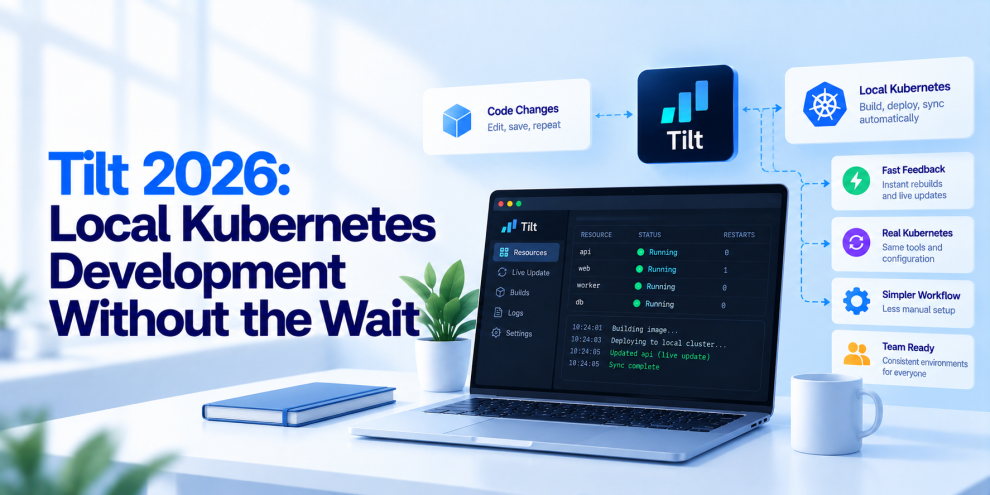
This is where Tilt comes in. Tilt is a development tool designed to make working with containerized applications and Kubernetes more efficient by automating build, deployment, and update workflows. Instead of manually repeating the same commands after every code change, developers can use Tilt to coordinate the local development environment and keep applications updated as they work.
For DevOps and platform engineering teams, the value goes beyond saving a few minutes. A faster development feedback loop can improve developer productivity, reduce configuration drift between local and cluster environments, and make complex microservices easier to test. The goal is not to eliminate Kubernetes complexity entirely. It is to make that complexity easier to manage during everyday development.
Why Local Kubernetes Development Becomes Slow
A typical Kubernetes development workflow involves several separate steps. Developers modify application code, build a container image, push or load the image into a local cluster, update Kubernetes resources, wait for the workload to become ready, and inspect logs or application behavior.
Each step introduces potential delays. Image builds can take time, Kubernetes resources may need to restart, and dependencies such as databases, message brokers, and other services may need to be available before the application can be tested. When a project contains multiple microservices, these steps can become even more complicated.
The problem is not necessarily Kubernetes itself. Kubernetes is designed to manage containerized workloads, scheduling, networking, and application lifecycle operations. It is not primarily designed to provide a rapid, interactive development experience every time a developer changes a file.
Without a dedicated development workflow, teams often rely on custom scripts, manual commands, and individual conventions. These approaches can work, but they tend to become inconsistent as the number of services and developers grows.
What Is Tilt?
Tilt is a development environment tool that automates the process of building, deploying, and monitoring applications during local development. It integrates with container build systems and Kubernetes workflows so developers can make changes and see the results without manually repeating the entire deployment process.
Tilt uses a configuration file, typically named Tiltfile, to describe how the development environment should operate. The configuration can define build steps, Kubernetes resources, dependencies, and other parts of the workflow. Tilt then uses that information to coordinate the development process.
When a developer changes a relevant file, Tilt can detect the change and trigger the appropriate update. Depending on the project configuration, that may involve synchronizing files into a running container, rebuilding an image, or updating Kubernetes resources.
This makes Tilt particularly useful for applications that need to run in a Kubernetes environment even during development. Rather than treating every code change as a complete deployment, teams can create a workflow that responds to the type and scope of the change.
How Tilt Improves the Development Feedback Loop
The central advantage of Tilt is reducing the amount of manual work between a code change and seeing its effect.
Consider a developer working on a backend API deployed to a local Kubernetes cluster. Without automation, changing a request handler may require rebuilding an image, updating the workload, waiting for the container to start, and reopening logs to verify the result.
With a properly configured Tilt workflow, the developer can save the file and allow the tool to perform the necessary update automatically. If the change can be synchronized into the running container, a complete image rebuild may not be necessary. If the change requires a new image, Tilt can trigger the build and deployment workflow.
The exact speed improvement depends on the application, image size, build configuration, cluster, and update strategy. Tilt does not make every rebuild instantaneous, but it can eliminate repeated manual steps and help developers spend more time testing behavior rather than managing deployment commands.
Understanding the Tiltfile
The Tiltfile is the central configuration point for a Tilt development environment. It describes how application resources should be built and deployed and how Tilt should respond to changes.
A simplified configuration might look like this:
docker_build(
    'backend-api',
    './backend',
    live_update=[
        sync('./backend/src', '/app/src'),
    ],
)

k8s_yaml('k8s/backend-api.yaml')
k8s_resource('backend-api')
This example illustrates the general idea: build a container image for a backend service, synchronize selected source files into the running container when possible, and load the Kubernetes configuration that defines the workload.
It is a starting point rather than a complete, universally executable configuration. The image name, container paths, Kubernetes resource names, build setup, and application restart behavior must match the actual project. Some code changes may require a process restart or a full image rebuild rather than file synchronization.
A well-maintained Tiltfile makes the development environment easier to reproduce and understand. Instead of requiring every developer to remember a sequence of commands, the team can maintain a shared description of how the application is built and run locally.
Live Update: Avoid Rebuilding Everything
One of Tilt’s most useful capabilities is Live Update. It allows developers to synchronize selected file changes into an existing container instead of rebuilding the entire image for every modification.
This can be especially helpful for interpreted languages and applications where source changes do not require a new native binary or a completely rebuilt dependency layer. A developer modifying a Python handler, for example, may be able to synchronize the changed source file into the container and restart the relevant process.
Live Update can also run commands inside the container when required. A project might use this to refresh generated files or restart a development process after a change.
However, file synchronization is not a universal replacement for image builds. Changes to system packages, dependencies, compiled binaries, or base images typically require rebuilding the image. Teams should configure update rules carefully so that the running application reflects the same dependencies and runtime assumptions as the intended container image.
The objective is to avoid unnecessary rebuilds without creating a development environment that behaves differently from the actual deployed artifact.
Managing Multiple Microservices
Local Kubernetes development becomes considerably harder when an application consists of many services.
A frontend might depend on an API gateway, which calls several backend services. Those services may rely on a database, a message broker, a cache, or a third-party integration. Starting each component independently creates a long sequence of commands and configuration decisions.
Tilt can coordinate multiple resources within one development environment. Developers can define the services they need, configure their build and deployment steps, and use resource dependencies to control the order in which components are brought up.
For example, a team developing an order-management feature might need the order API, inventory service, PostgreSQL, and a message broker. A shared Tilt configuration can help bring those resources into a usable state and expose their status through a common interface.
This does not remove the need to design service dependencies correctly. Databases still need initialization, applications need retry logic, and services must handle startup failures. Tilt helps coordinate the development workflow; it does not replace the resilience mechanisms that production applications require.
Tilt and the Kubernetes Development Stack
Tilt is one option in a broader ecosystem of tools designed to improve the developer experience around Kubernetes.
Docker provides container build and runtime capabilities. Kubernetes manages workloads and cluster resources. Local clusters such as kind and Minikube provide environments for testing Kubernetes workloads on a developer’s machine. Tilt coordinates the build-and-deploy feedback loop across these components.
Other tools address similar problems with different approaches. Skaffold focuses on development workflows for building, pushing, and deploying containerized applications. Telepresence helps developers connect local processes to services in a remote Kubernetes environment. DevSpace also provides workflows for developing and debugging applications on Kubernetes.
These tools overlap in some areas, but they are not interchangeable in every project. Tilt is particularly worth evaluating when a team wants an interactive development environment with automatic updates and coordinated resources. Teams should compare tools against their actual workflows rather than choosing one based on a feature checklist alone.
Local Kubernetes Still Requires Resource Planning
Tilt can automate development tasks, but it cannot remove the resource requirements of the applications being run.
A large microservices environment may consume significant CPU and memory, particularly when the local cluster runs databases, observability agents, message brokers, and multiple backend services. Container image builds can also compete with application workloads for system resources.
For this reason, teams should avoid assuming that every production service must run locally at all times. Developers can select a smaller set of services for the workflow they are testing, use mocks or test doubles for unrelated dependencies, and connect to approved shared development services where appropriate.
The goal is to reproduce the dependencies that matter for the task without recreating the entire production environment on every workstation.
Platform teams can support this by providing standard local-development configurations, resource profiles, test datasets, and clear guidance about which dependencies should run locally and which should be accessed remotely.
Security Considerations for Local Kubernetes Development
Local development environments can contain sensitive configuration, service credentials, internal endpoints, and data that should not be exposed. Adding automation does not remove these risks.
Teams should ensure that local Kubernetes configurations do not include production secrets, that developers receive only the access required for their work, and that shared development environments enforce appropriate authentication and network restrictions.
Container images should come from approved sources, dependencies should be managed consistently, and development workloads should avoid unnecessary privileges. Teams should also be careful when mounting local files into containers, since an overly broad mount can expose files outside the intended project directory.
Tilt configuration should be reviewed like other development infrastructure code. Changes to build commands, container configuration, mounted paths, and deployment resources can affect both security and reproducibility.
Local development should be convenient, but it should not become a shortcut around the organization’s security policies.
Testing and Debugging With Tilt
Fast updates are valuable only when developers can quickly understand what happened after a change.
Tilt provides a unified interface for viewing resource status and logs, helping developers identify failed builds, unsuccessful deployments, and application errors. This can reduce the need to switch repeatedly between terminal commands and separate Kubernetes inspection tools.
Teams should still use appropriate testing layers. Unit tests validate isolated logic, integration tests verify interactions between components, and end-to-end tests confirm that the wider application behaves as expected. Tilt can support interactive development and testing, but it does not replace automated CI checks.
A useful workflow is to use Tilt for rapid local iteration and rely on CI/CD pipelines for repeatable verification. Before changes are merged, automated tests and security checks should run in a controlled environment. Production deployments should continue through the organization’s approved release process.
Tilt Is Not a Replacement for CI/CD
One common misunderstanding is that a faster local Kubernetes workflow makes deployment automation less important. In reality, Tilt and CI/CD solve different problems.
Tilt helps developers build and test applications interactively. CI/CD systems automate verification, artifact creation, release approval, and deployment across shared environments.
A developer might use Tilt to validate a change against a local database and several dependent services. A CI pipeline should then run the required tests, inspect dependencies, build the approved artifact, and verify the deployment configuration. A separate release workflow can promote that artifact through staging and production according to organizational policies.
Keeping these responsibilities separate prevents local development shortcuts from becoming production deployment assumptions. It also creates a clear path from experimentation to a reproducible release.
How to Introduce Tilt Across an Engineering Team
A successful rollout should begin with a service that has a clear development pain point. Choose an application with slow rebuilds, multiple dependencies, or frequent Kubernetes configuration changes. Document the existing workflow and measure how long common changes take to test.
Next, create a shared Tiltfile, configure the necessary build and deployment resources, and introduce Live Update where the application supports it. Keep the initial setup focused on the services developers need most often. Validate the configuration on more than one workstation to identify assumptions about file paths, environment variables, image availability, or local cluster settings.
Once the workflow is stable, document how developers start the environment, inspect logs, handle failed updates, and reset local state. Track practical outcomes such as time from code change to testable behavior, setup time for new developers, and the frequency of environment-related failures.
The objective is not to introduce another tool for its own sake. It is to reduce friction in the development process and make local Kubernetes workflows consistent across the team.
Where Engineering Teams Fit
Improving Kubernetes developer experience requires coordination across application architecture, containerization, deployment automation, testing, and platform engineering. Teams like GeekyAnts work across backend development, cloud-native application engineering, and modern product architecture, making this broader perspective relevant for teams looking to streamline their local development workflows. The focus should be on creating repeatable environments that help developers move faster while preserving security, testability, and production consistency.
The Future of Kubernetes Development
As organizations adopt more microservices and Kubernetes-based platforms, developer experience is becoming an increasingly important part of platform engineering. Developers need environments that are quick to start, predictable to use, and close enough to production to reveal meaningful integration problems.
Tilt addresses one important part of that challenge by automating the build-and-deploy loop during local development. Its value comes from reducing repetitive work, coordinating multiple services, and helping developers observe the result of a change sooner.
It is not a substitute for good container design, reliable tests, secure configuration, or a well-managed CI/CD pipeline. Instead, it connects those engineering practices to a faster interactive workflow.
For DevOps teams in 2026, the practical goal is straightforward: make Kubernetes easier to develop against without weakening the controls that make it reliable in production. Tilt can be a useful part of that strategy when its capabilities match the application’s architecture and the team’s development needs.
For more, visit our homepage!


Add Comment